
Frill alternative

Why teams switch from Frill to Lenit

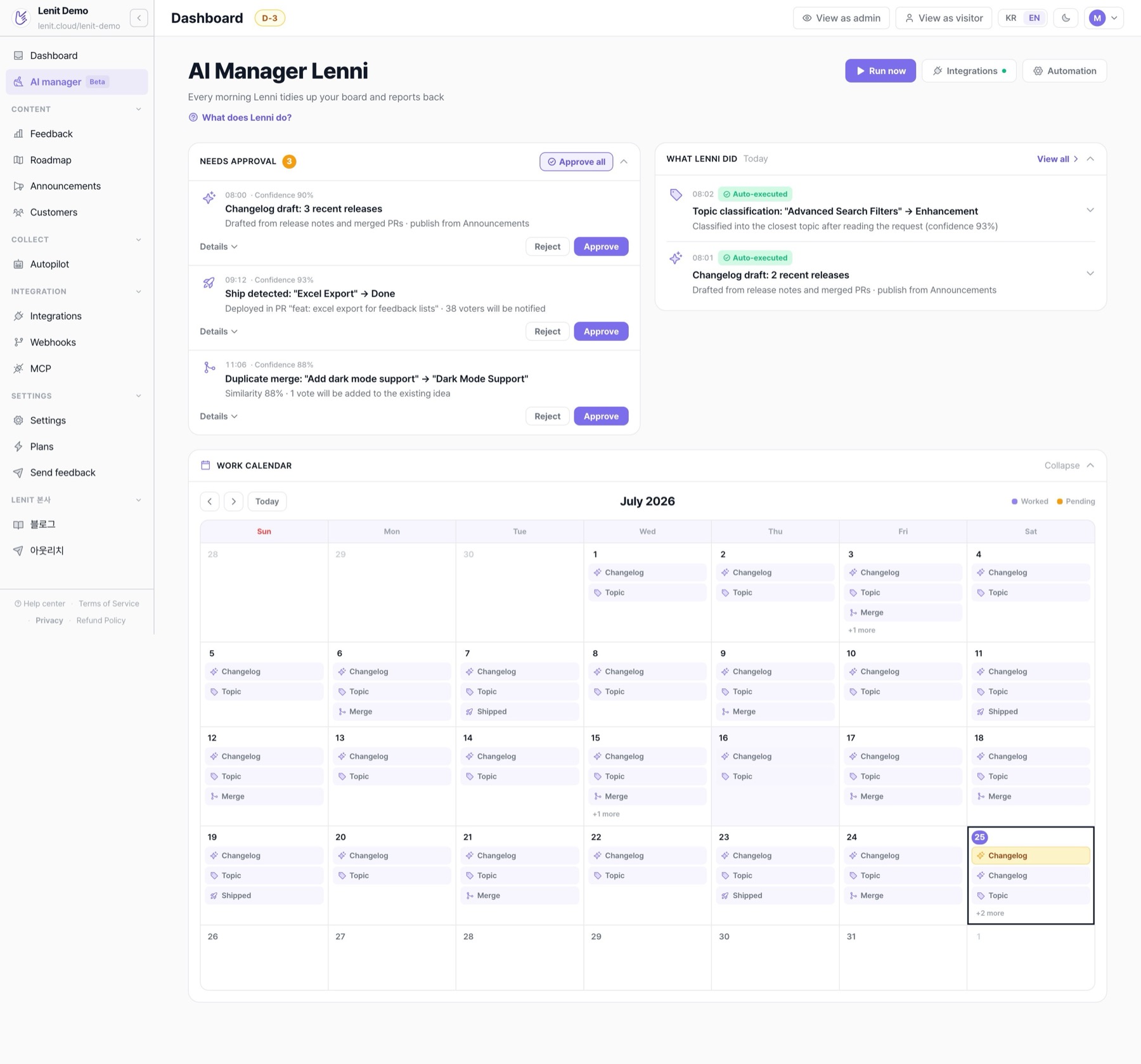
Every feedback board goes stale without daily upkeep. Connect GitHub, and Leni, Lenit's AI manager, closes shipped requests, notifies voters, and drafts the changelog every day.
lenit.cloud
Lenit's AI manager Leni dashboard: approval queue, auto-executed work, and work calendar

Frill is well-regarded for its flat pricing and modern UI, but the lack of AI features is the biggest gap. Pulling feedback from conversations, deduplicating similar ideas, generating weekly summaries, all manual. The 14-day trial (no permanent free tier) also makes evaluation tight.

Frill is simple, but nothing runs itself

Flat pricing is nice, yet upper tiers climb fast from $149/mo, and even then there's no AI: no dedup, no automated ops. Every bit of board upkeep is on you.

Frill

Practically no AI

No dedup, no automated ops. Every bit of board upkeep is on you.

Open requestsNo owner
Dark mode▲ 42Voting31d
Slack integration▲ 27Voting19d
CSV export▲ 15Voting12d
Last status change31 days ago
Shipped 2 weeks ago, still “Voting”
Also worth knowing

No free plan

A 14-day trial only, so there's no low-stakes way in.

Steep upper tiers

Growth jumps to $149/mo, Enterprise to $349+/mo.

So with Lenit, the board manages itself.

Connect GitHub once, and all of this happens automatically every day. The board stays current without an admin.

Ship it, and it closes itself

Leni reads your GitHub changes daily and marks related feedback as done.

BoardSynced
Voting
In progress
Done
Dark mode
Status syncAutomatic

New feedback files itself

Each request is read and classified under the right topic. The board stays tidy on its own.

InboxNew
Add dark mode please2 min ago · widget
Bug FeatureUI
TopicAuto-classified

Duplicates become one

Similar requests are detected and merged, votes and comments included. No more split votes.

Duplicates2 found
Dark mode · 7↑Night theme · 5↑
Dark mode · 12↑
Votes & commentsKept together

Publish, and voters hear about it

Leni reads your GitHub releases and merged PRs and drafts a changelog with the related feedback linked. Review and publish, and everyone who voted on that feedback gets notified.

ChangelogPublished
v1.24 · Dark mode3 requests closed
42 voters
NotifyEveryone who voted

Frill vs Lenit: the key differences

See exactly how the pricing and day-to-day operations compare.

Feature
Lenit
Frill
Pricing model
Flat per workspace (seats included · unlimited end users)
Flat per workspace
Paid starts at
$39/mo flat (3 seats · AI included)
$25/mo
Daily board ops
Leni, the AI manager, runs it
Manual admin work
Ship → close feedback
Automatic via GitHub
Manual status updates
Changelog writing
Leni drafts it for you
Written by hand
AI cost
Included (Pro: 500 AI replies/seat/mo)
No AI suite
Free to start
14-day free Pro trial
None (14-day trial only)
Built for
Startups & solo builders
Teams wanting a simple board
Free · done by the Lenit team

Migrate from Frill to Lenit. We move the data for you.

Send us your Frill export and the Lenit team moves ideas, vote counts, statuses, topics, and creation dates over for free. Customer lists you can import yourself via CSV.

How it works
  1. 1Export a CSV from your Frill dashboard (Settings → Export)
  2. 2Sign up for Lenit and email the file to minseok1768@lenit.cloud — the Lenit team moves ideas, votes, statuses, topics, and dates for you, free (customer lists: Customers → Import)
  3. 3Swap one line of widget code and you're done (optional: redirect old Frill URLs)
FrillFrillexport.csv · 1,248 rows
Migrating
LenitFree
Ideas
Votes
Statuses
Topics
Created dates