
Publicly reported numbers put the share of support conversations an AI chatbot closes without a human at roughly 30–70%. What decides where you land in that range isn't so much which tool you pick as how complete the help docs are that the AI answers from.
And because every vendor's "resolution rate" counts something slightly different, you can't just line the numbers up side by side. This post collects the public figures along with their definitions, then walks through how to estimate how much your own team's workload would actually drop. (Last updated: 2026-10-07)
How much do AI chatbots actually reduce support volume?
The public numbers range from 14% to 76%. That's because each "AI support" figure counts a different thing, measured by a different party, across a different set of customers.
14% — Gartner surveyed 5,728 customers and found only 14% fully resolved their issue through self-service (published August 2024). That includes help articles and FAQs, not just chatbots.
Around 28% — In cases Channel Talk, a Korean support platform, published in December 2024, B2B SaaS companies saw AI resolution rates of 27.9% (Channel Talk itself) and 28.7% (Campaigners).
About 40% — Crisp aggregated 27,000 workspaces on its platform and found that, for teams using AI, about 40% of conversations ended without a human (2026 report).
70% — The median of 195 case studies published by 38 vendors (Lorikeet, October 2026). Keep in mind that the successful cases are the ones that tend to get published.
76% — The average resolution rate Fin (formerly Intercom) states on its official site.
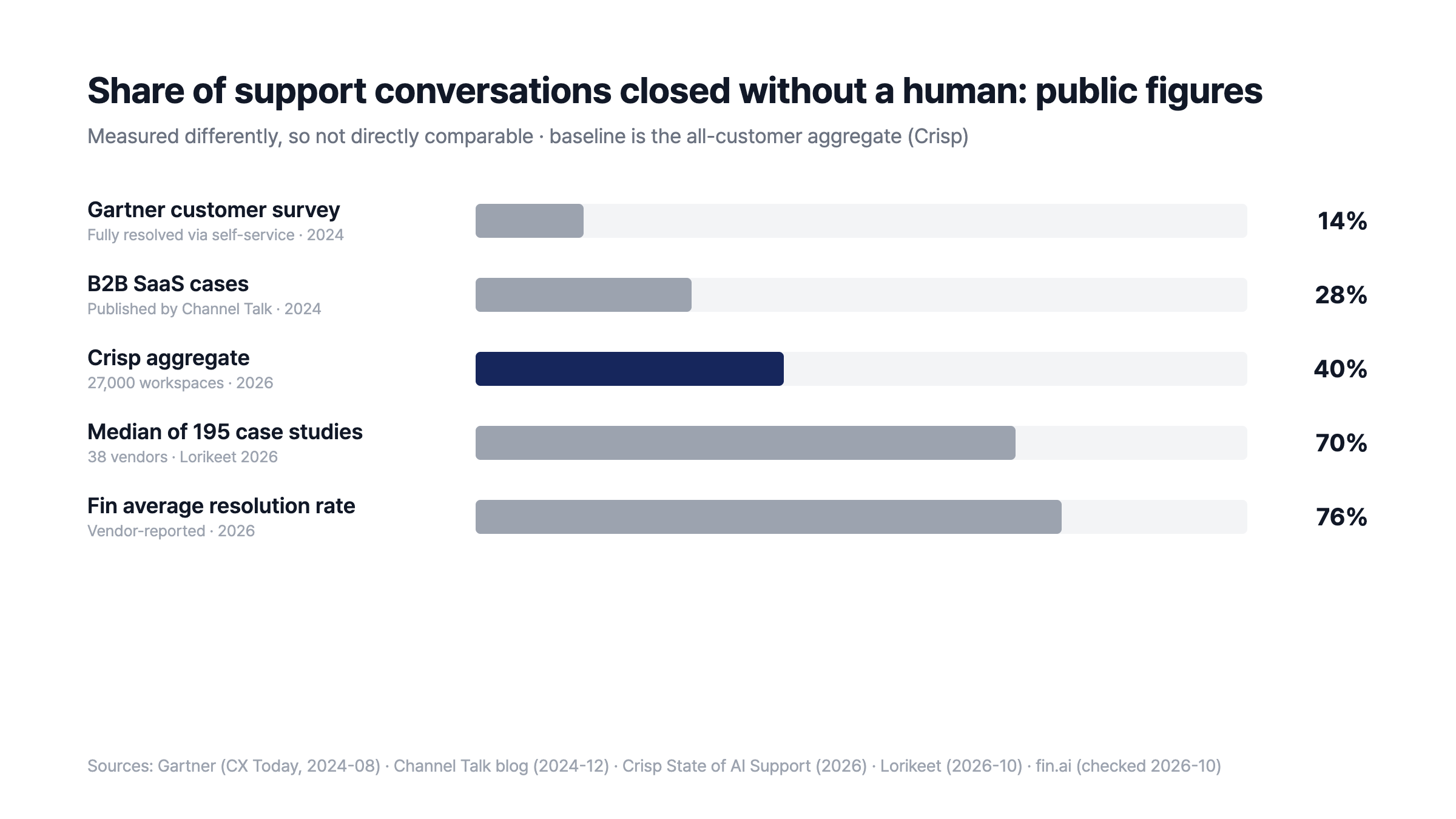
Public figures measured on different bases (sources at the bottom of the chart)
The lowest numbers come from customer surveys and the highest from vendor announcements. A customer survey asks "was my problem fully solved?", while vendor figures usually count "did it avoid going to a human?", so the same conversation can be scored differently.
Industry matters too. E-commerce, with lots of shipping and return questions, tends to score high, while B2B products, where many questions need real action on an account or a bill, tend to score lower. That's why Crisp's 40%, aggregated across all of its customers, is the closest baseline for an "average team."
How should you read "80% resolution rate"?
A resolution rate is usually the share of conversations the AI was involved in that didn't get handed to a human. The denominator is only the conversations the AI took, not all of your inbound, so "80% resolution" doesn't mean "80% fewer tickets."
Metric | Numerator | Denominator |
|---|---|---|
Engagement rate | Conversations the AI took part in | All conversations |
Resolution rate | AI conversations that didn't go to a human | Conversations the AI took part in |
Automation rate | Conversations the AI closed without a human | All conversations |
The volume that actually goes away is the automation rate, and automation rate = engagement rate × resolution rate. If the AI takes 60% of all inbound and closes 80% of those, your total volume drops by 48%.
The definitions also vary by tool. Channel Talk's documentation defines resolution rate as "the share of conversations ALF was involved in that weren't connected to a human." Fin also counts a customer leaving the conversation without asking for more help as resolved, and in July 2026 it changed its definition to exclude conversations the AI couldn't answer from the denominator. According to Lorikeet's analysis, that change alone moved one customer's resolution rate from 33% to 50%.
Zendesk, on the other hand, only counts an automated resolution if the customer doesn't come back within a set window after the AI answers, which makes it relatively strict. So when you compare tools, it's more useful to ask "how many conversations went away, out of all inbound?" than to compare resolution rates.
What's left for your team gets harder
When the AI takes the easy questions, the hard ones are what's left for people. In Crisp's report, response times on human-handled conversations actually went up after teams adopted AI, because the remaining questions were harder.
Pushing the AI share as high as possible has limits, too. Klarna announced in February 2024 that its AI was handling two-thirds of support chats, but in May 2025 its CEO acknowledged quality had slipped and the company started hiring human support staff again. Korean digital bank Toss Bank had AI handling 70% of support, but satisfaction among chatbot users was 36%, half that of call center users (72%) (Money Today, May 2026).
That's why well-run teams design the AI to hand off anything it doesn't know straight to a human. The handed-off conversation carries the full AI exchange with it, so the customer doesn't have to explain again and the person picking it up can read the context and get straight to the point. While the AI takes the repetitive questions, people get more time for the hard ones.
You can also put AI next to your support team. An NBER study (Brynjolfsson et al.) found that support reps who got AI-suggested replies resolved 14% more issues per hour, and new reps 34% more. Using AI that talks to customers alongside AI that assists your team helps your team get through the harder conversations faster.
Liability for wrong answers is worth thinking about as well. In 2024, after an airline's chatbot misstated its refund policy in Canada, a tribunal ordered the company to pay damages. A chatbot's answer counts as the company's answer. So rather than answering plausibly without a source, it's safer for the AI to be upfront and pass anything not in the docs to a human.
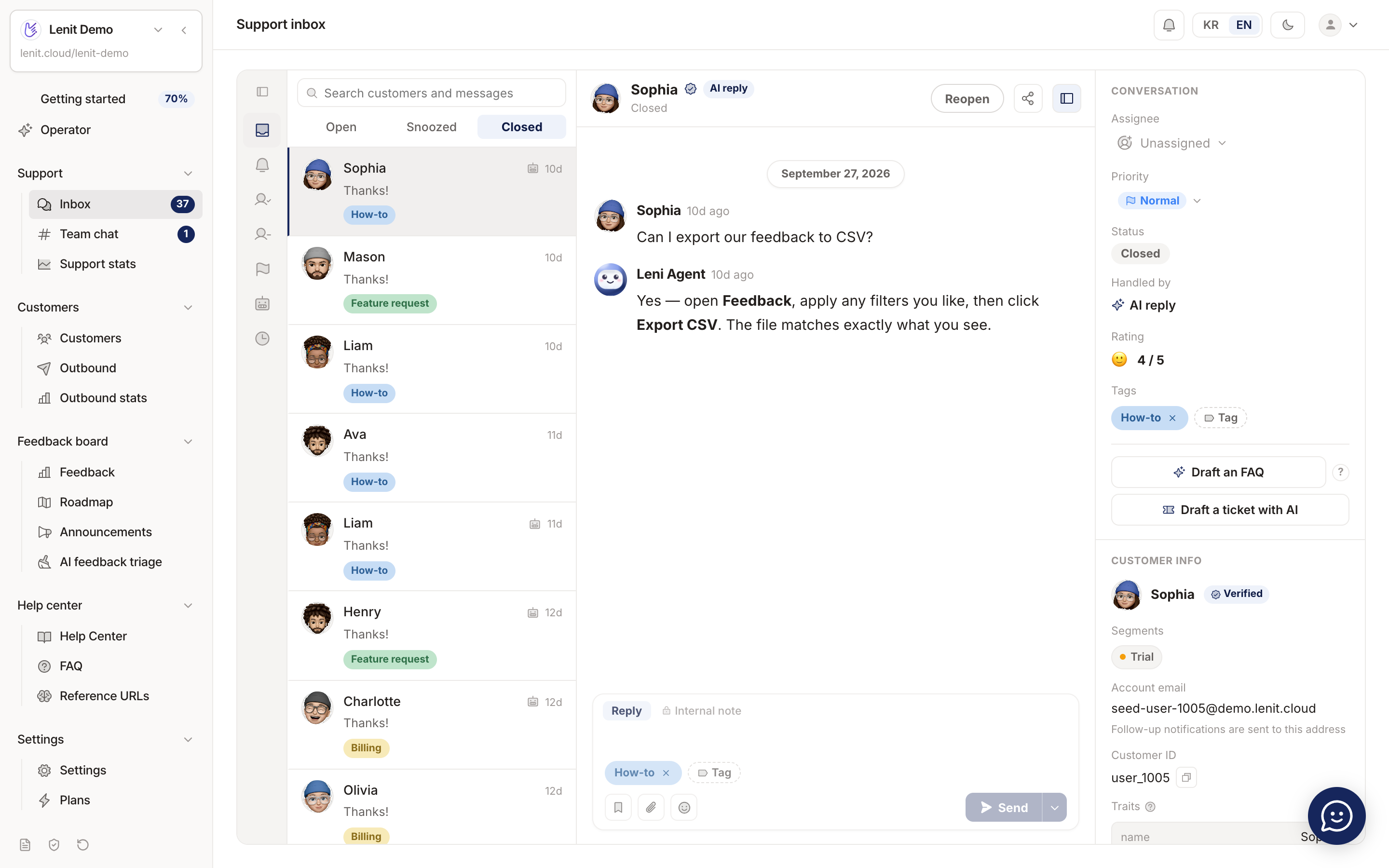
The AI answers from the help docs and the conversation closes without a human (demo data)
Help docs are what move the resolution rate
The biggest lever on AI resolution rate is the documentation the answers are based on. In Gartner's survey, the top reason self-service failed was "couldn't find relevant content" (43%).
Tiro, a Korean AI meeting-notes SaaS, reorganized its help docs by topic (getting started, key features, account management, FAQ) and then reached a 70.2% resolution rate, while bug reports dropped from 86 to 33 a month (Channel Talk customer story, January 2026). Same kind of B2B SaaS, and the number more than doubled before and after organizing the docs.
Here's how to prepare before you roll it out.
Sort your last 100 conversations by type — how-to, account and billing, bugs, feature requests. The bigger the share of how-to questions, the more the AI will help.
Write up the most common how-to questions first — questions whose answer fits in one paragraph are the ones AI handles best.
Read the conversations the AI handed off every week — if the reason was "not in the docs," fill the gap; if it was "needs an action" (refunds, account changes), keep that as human territory.
Collect feature requests instead of answering them — send them to a feedback board and the conversation closes while the request gathers votes.
The same resolution rate costs different amounts depending on billing
AI support pricing generally falls into three models: per resolution, per engagement, and included in the plan. Even at the same resolution rate, the real cost of one resolution changes with the model.
Per resolution — Fin charges $0.99 per resolution; Zendesk charges $1.50 (committed) to $2.00 per automated resolution beyond the included amount. Only conversations counted as resolved are billed.
Per engagement — Channel Talk's ALF charges ₩500 per conversation it takes part in (as of the November 2025 pricing change). Under this model, cost per resolution = price per engagement ÷ resolution rate, so at a 45% resolution rate one resolution costs about ₩1,111 (calculated).
Included — Lenit includes 500–1,500 AI responses per seat per month in the plan, and when they run out, conversations go to your team with no extra charge.
Which model works out better depends on your volume and resolution rate. It's worth plugging your monthly AI conversation count and expected resolution rate into all three once.
How much will your team's volume drop? Run the numbers
Let's assume a team with 1,000 conversations a month adds AI support, and calculate how much volume actually goes away. The engagement and resolution rates are set around the middle of the public figures above.
Step | Rate | Conversations |
|---|---|---|
All inbound | — | 1,000 |
Taken by the AI first (engagement rate) | 60% | 600 |
Closed by the AI without a human (resolution rate) | 50% | 300 |
Left for your team | — | 700 |
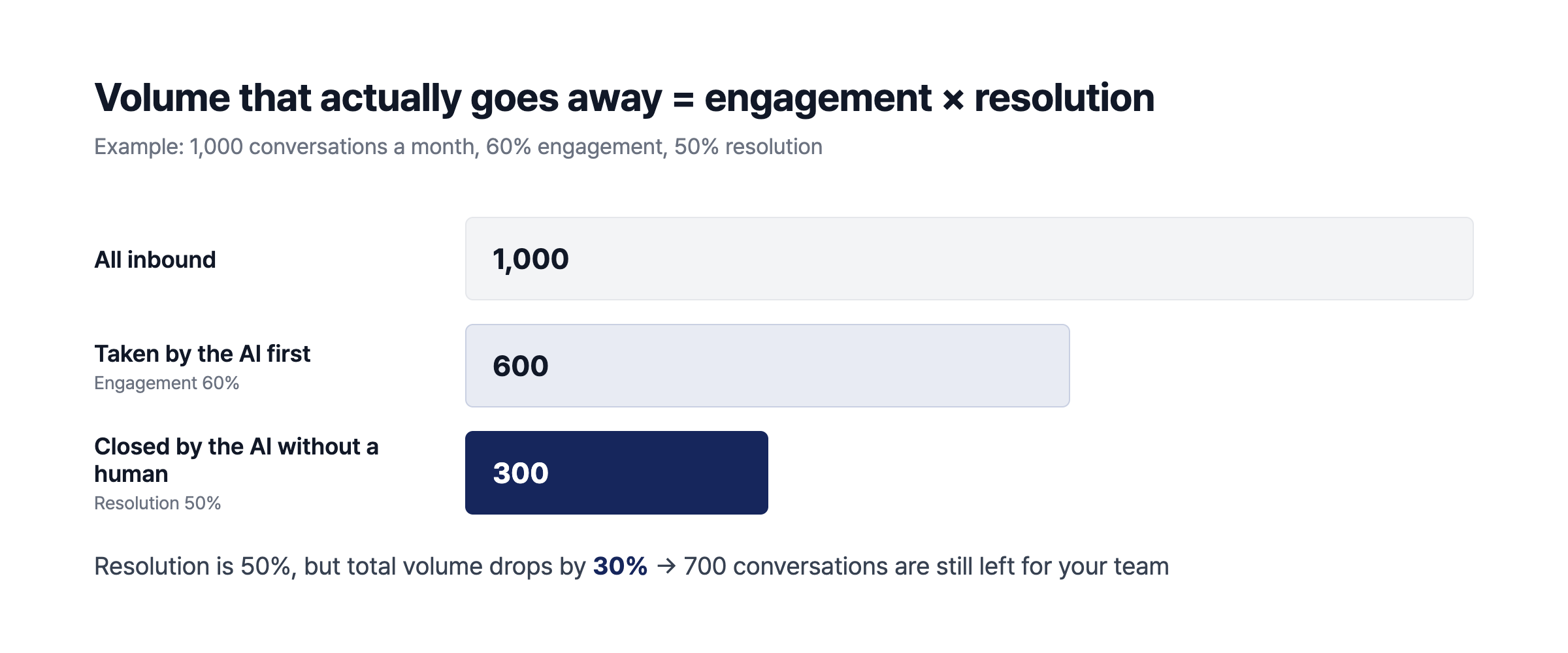
60% engagement × 50% resolution = 30% automation (worked example)
This team's volume drops by 30%. The range is wide even for the same team. If thin docs keep the resolution rate at 30%, 180 conversations (18%) go away; fill the docs and raise engagement to 80% and resolution to 70%, and 560 (56%) go away (all calculated).
So it's better not to judge by the first month. In Crisp's data, the share of conversations closed by AI alone rose from 22% in January 2026 to 40% in August, and most teams raise their numbers over several months as they fill in their docs.
Source: Crisp State of AI Support report (crisp.chat), captured 2026-10-07
Wrapping up
AI chatbots clearly reduce support volume. But calculate the reduction as engagement rate × resolution rate rather than trusting the resolution rate a tool advertises, and know that what raises that number is your help docs and how you design the handoff to humans.
Lenit's AI support answers from the help docs inside the same product, and when there's no source, it hands off to your team instead of making something up. Feature requests that come up in conversations flow into the feedback board, and AI responses are included in the plan, so your bill doesn't move on its own when inbound grows.
If you're comparing support tools, see our Crisp alternatives guide; if you want to see how feature requests from support turn into a feedback loop, read the Featurebase alternative comparison. Lenit is free to start (AI support from Starter), and you can bring in your existing help docs just by entering their URL. 🙂
Frequently asked questions
What's a good AI chatbot resolution rate?
It depends on the definition, so no single number works. In Crisp's all-customer data about 40% of AI conversations ended without a human, and the median of vendor-published case studies is 70%. A sensible first target is a 20–30% automation rate against all inbound, then raise it as you fill in your docs.
Does an 80% resolution rate mean 80% fewer tickets?
No. Resolution rate usually uses only the conversations the AI took as its denominator. The real reduction is engagement rate × resolution rate, so if the AI takes 60% of inbound and closes 80% of those, total volume drops by 48%.
Can we cut support headcount after adding an AI chatbot?
What goes away is mostly simple how-to questions, so what's left gets harder. In Crisp's data, response times on human-handled conversations went up after teams adopted AI. Rather than cutting people, plan to move the time spent on repetitive questions to harder conversations and to improving your docs.
We barely have help docs. Can we still use an AI chatbot?
You can, but resolution will be low. Without docs to answer from, the AI ends up handing most conversations to your team. Write up the 10–20 most common how-to questions from recent conversations first, and your first month will look very different.
How long does it take to see results?
It usually climbs over several months rather than in the first one. In Crisp's data, the share of conversations closed by AI alone rose from 22% in January 2026 to 40% in August. Teams that read handed-off conversations every week and fill the missing docs improve fastest.
Do AI chatbots work for B2B SaaS?
Yes. B2B SaaS usually starts lower than e-commerce because more questions need action on an account or a bill. In cases published in 2024, B2B SaaS resolution rates were around 28%, and Tiro reached 70.2% after reorganizing its docs by topic.