
A live chat script works best as a frame, not a finished sentence: acknowledge, check, resolve, and say what happens next. Below are 30 customer service response templates for the conversations SaaS teams actually handle, from billing, refunds, and cancellations to bugs, outages, account access, feature requests, onboarding, and angry customers.
Most script roundups are organized around the stages of a chat (greet, hold, transfer, close) and borrow their examples from e-commerce: late packages, returns, items out of stock. SaaS support has a different mix, with more questions that can't be closed in one reply. So this guide also covers how to keep canned responses from sounding canned and how to audit them every quarter. (Last updated: 2026-10-14)
What makes a live chat reply work?
Every good reply, short or long, does four jobs: it acknowledges what happened to the customer, shows what you checked, says what you fixed, and tells them what happens next. Skip one, and the customer usually writes back with the same question.
Acknowledge — name the specific problem ("you were charged twice") instead of a stock "sorry for the inconvenience."
Check — read the account, plan, and conversation history before you ask anything, and ask only for what's missing.
Resolve — say what you just did, or the one step the customer needs to take.
Next step — say when you'll follow up and what the customer should do in the meantime.
The check is the step that's easiest to skip. In Zendesk's CX Trends 2026 report, 74% of consumers said it's frustrating to tell their story over and over to different people. Asking "could you describe the issue again?" after they already did undoes whatever empathy came before it.
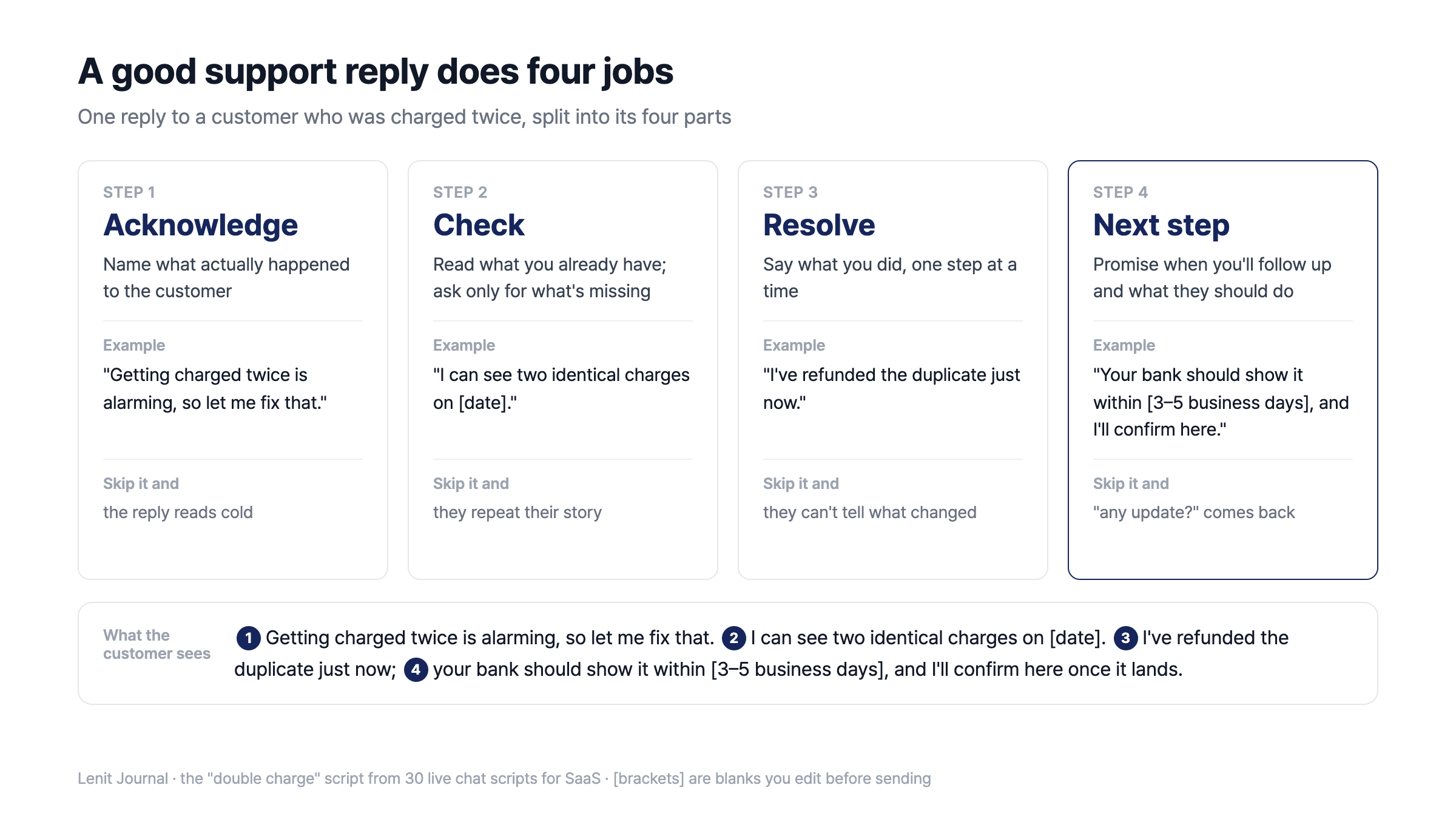
The four parts of a good reply, using the double-charge script
The next step matters most when you can't fix the problem on the spot. A reply that ends with "we'll look into it" gives no timeline, so a few hours later you get "any update?"
Three scripts for every chat: greeting, hold, and after-hours
In the templates below, double braces like {{customer}} are variables your help desk fills in, and [square brackets] are blanks you edit before sending. In Lenit, as in most help desks, a saved reply fills in the customer's name the moment you insert it.
Situation | Send this |
|---|---|
Greeting | Hi {{customer}}, thanks for reaching out to {{company}}. I'm reading your message now and will have an answer for you shortly. |
Hold | I'm checking your [billing history] so I can give you an exact answer. It should take about [3 minutes], and I'll post what I find right here. |
After hours | Our team is offline right now, so we can't reply live. We'll pick up your message first thing at [10 a.m. ET tomorrow]. If it's a billing or login issue, [this help article] may get you unstuck sooner. |
The other 27 are grouped by what the customer is dealing with: money, something broken, the product itself, or frustration that's boiled over.
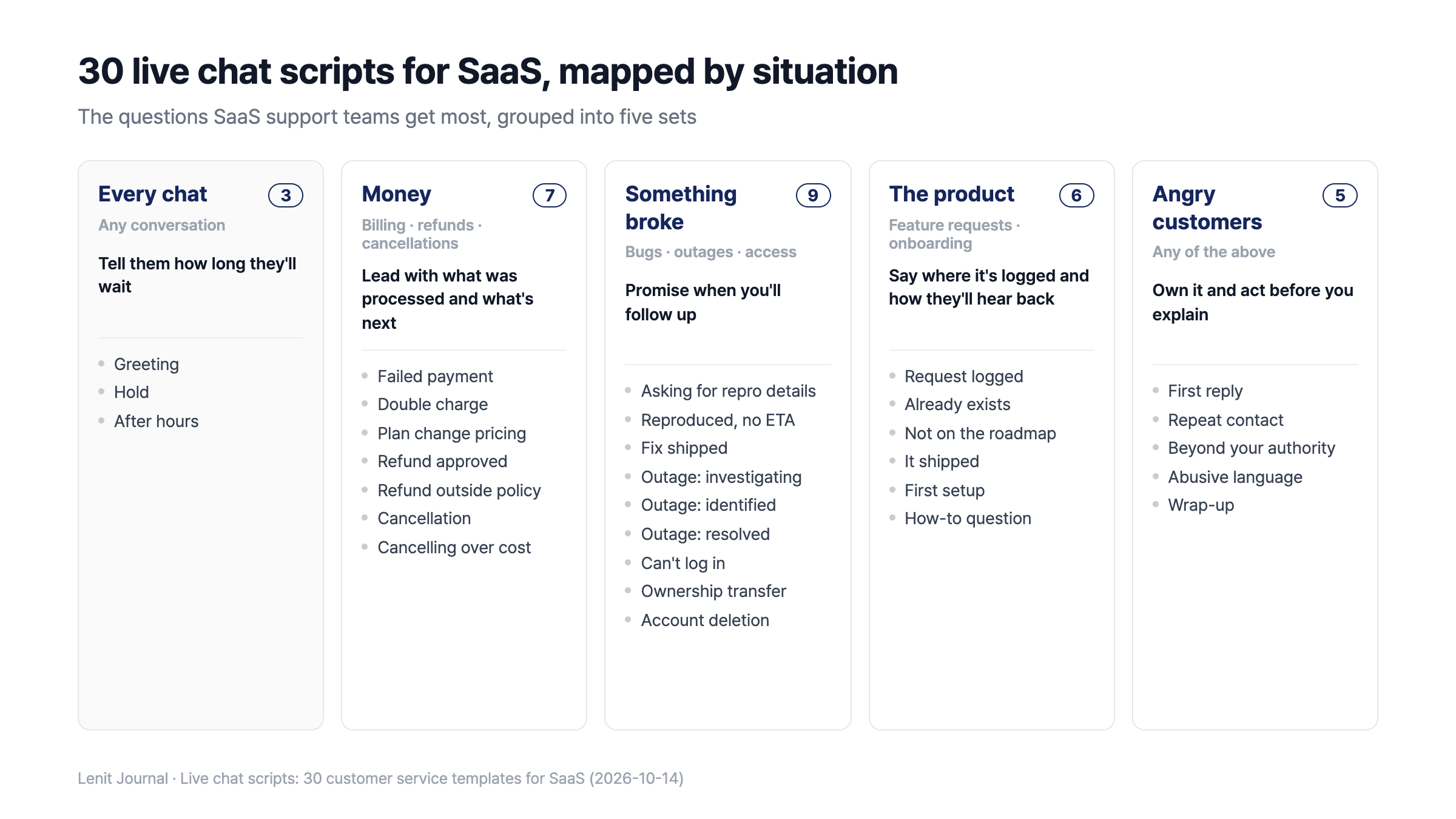
The 30 live chat scripts in this guide, grouped by situation
Billing, refund, and cancellation scripts
When money is involved, lead with what was processed and what the customer does next, not with policy. Amounts, dates, and windows vary by company, so edit every [bracketed] blank before you send.
Failed payments and plan changes
A failed charge is rarely the customer's fault, so report what you confirmed (the bank's response) instead of guessing at a cause. Telling them how long the account stays active takes the urgency out.
Situation | Send this |
|---|---|
Failed payment | Sorry for the hassle. Your bank declined the card, so the renewal didn't go through. You can update it under [Settings > Billing] and we'll retry right away. Your account stays active until [date], so there's no rush before then. |
Double charge | Getting charged twice is alarming, so let me fix that. I can see two identical charges on [date]. I've refunded the duplicate just now; your bank should show it within [3–5 business days], and I'll confirm here once it lands. |
Plan change pricing | If you switch from [current plan] to [new plan] today, you'll pay only the prorated difference of [amount] for the [12 days] left in this billing cycle. From [next billing date], you'll be billed at the [new plan] rate, and the new features unlock right away. |
Refunds
When you can't refund, don't stop at "that's against our policy." Offer at least one alternative, so the customer has a choice to make instead of a dead end.
Situation | Send this |
|---|---|
Refund approved | I've refunded the [amount] charged on [date]. It'll show on your card within [3–5 business days], and your account stays active until [date]. |
Refund outside policy | I'm sorry this isn't the answer you hoped for. It's been more than [14 days] since the charge, so a full refund isn't possible. What I can do is cancel the renewal now so you're not billed again, or extend your plan by [the unused period]. Which would you prefer? |
Cancellations and downgrades
Tell people how to cancel first, then ask why, once. If cost is the reason, offering a smaller plan one time is fair; offering it twice starts to feel like a retention maze.
Situation | Send this |
|---|---|
Cancellation | Thanks for giving [product] a try. Here's how to cancel: go to [Settings > Plan] and click "Cancel subscription." You won't be charged after [date], and everything keeps working until then. We keep your data for [30 days] in case you come back. If you have a second, one line on why you're leaving would really help us. |
Cancelling over cost | That makes sense. If you mainly use [features A and B], the [smaller plan] covers both and would save you [amount] a month. I can switch you now, or, if you'd still rather cancel, I'll take care of that instead. |
Bug, outage, and account access scripts
Bugs, outages, and account problems often can't be fixed during the chat, so a promise about when you'll follow up is what keeps the customer calm while the fix is in progress. If that time arrives with no progress, a short "still working on it" message keeps the promise.
Bugs
Your first reply to a bug report should ask for what you need to reproduce it, not guess at the cause. Don't re-ask for details they already gave; number the missing ones so they can answer in a single message.
Situation | Send this |
|---|---|
Asking for repro details | Sorry [feature] isn't working. I know that's frustrating. To reproduce it, could you send three things? 1) the URL where it happens, 2) your browser, 3) a screenshot if you can. I'll try the same steps on our side as soon as I have them. |
Reproduced, no ETA | Thanks, we've reproduced the issue on our end, and I've passed it to our engineers. I'll update you in this conversation as soon as there's a fix date. In the meantime, [workaround] gets you the same result. |
Fix shipped | Hi {{customer}}, the [issue] you reported on [date] is fixed as of today. Could you refresh and give it a try? If anything still looks off, reply here and I'll pick it right back up. Your detailed report is why we could fix it this fast. |
Outages
Post outage updates in three messages (investigating, identified, resolved) and put the time of the next update in each one. Atlassian's incident communication templates end their outage messages the same way, with a blank for "Next update in < time until next update >".
Situation | Send this |
|---|---|
Investigating | We're looking into an issue affecting [feature]. Sorry for the disruption. We'll post an update within [30 minutes] at the latest, and you can follow along on [status page]. |
Identified | We've found the cause of the [feature] outage and are working on a fix. Until it's resolved, [impact] may be affected. Next update by [3:00 p.m. ET]. |
Resolved | [Feature] has been working normally since [time]. The cause was [one-line cause], and we've [prevention step] so it doesn't happen again. Thanks for your patience. If anything from that window didn't go through, let us know. |
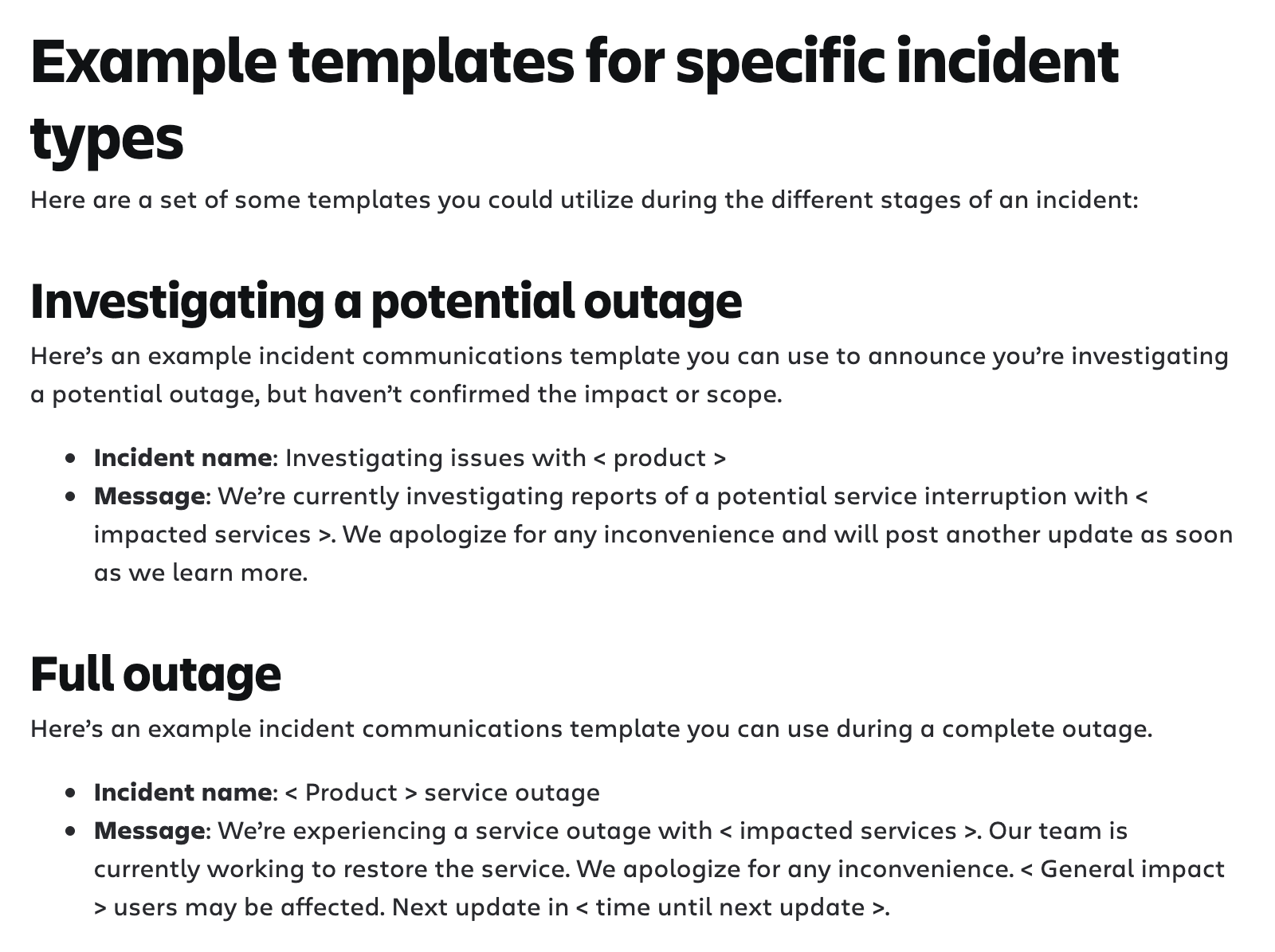
Source: Atlassian incident communication templates (atlassian.com), captured Oct 14, 2026
Account access
Account requests often can't be handled instantly for security reasons. One sentence explaining why you need verification makes the request read as protection rather than suspicion.
Situation | Send this |
|---|---|
Can't log in | Sorry you're locked out. Is {{email}} the address you signed up with? If so, use "Reset password" on the login page to get a new link. If it doesn't arrive within [5 minutes], check your spam folder and let me know. |
Ownership transfer | To transfer ownership, we need the current owner to confirm, which protects your workspace from unauthorized changes. I've emailed the current owner; once they approve, [new owner] gets full access. If the owner has left the company, send us [documentation] and we'll help another way. |
Account deletion | I've received your request to delete your account. Deletion permanently removes [data scope] and can't be undone, so I want to double-check first. Reply "confirm deletion" and we'll complete it within [7 days] and email you when it's done. |
Feature request and onboarding scripts
A feature request answered with "we'll pass it along" leaves the customer guessing where it went. Tell them where the request is recorded and how they'll hear about changes, and you won't get the same question next month.
Feature requests
Situation | Send this |
|---|---|
Request logged | Thanks for the idea. [Feature] would make [their goal] a lot easier. I've added it to our [feedback board], where requests with more votes get prioritized, and you'll get an update at {{email}} whenever its status changes. |
Already exists | Good news: [feature] already exists. You'll find it under [menu path], and this guide walks through the setup: [help article]. If it was hard to find, that's on us, and I'll flag it. |
Not on the roadmap | [Feature] isn't on our roadmap right now, so it's unlikely to ship soon. In the meantime, [alternative] covers most of the same job. I've kept your request on the board, and we revisit it as similar requests come in. |
It shipped | Hi {{customer}}, the [feature] you asked for on [date] is live today. You'll find it under [menu path], and here's a quick guide: [help article]. Thanks for the original suggestion; it helped us build this. |
The one customers remember is the "it shipped" message. It's also the hardest to send, because months later nobody remembers who asked. We covered how that loop can stay closed without daily upkeep in our Featurebase alternative guide.
Lenit's chat widget has a Feedback tab built in, so the [feedback board] link in the "Request logged" script takes customers straight to a board where they can post the request and others can vote on it. On Pro, Leni, Lenit's AI manager, detects when a feature ships and notifies the people who posted and voted for it, with final approval staying with your team.
Onboarding and how-to questions
For how-to questions, reply with two or three steps plus a help article link instead of a long explanation. You can reuse the same answer the next time it comes up.
Situation | Send this |
|---|---|
First setup | Welcome aboard. To get value on day one, set up [key setting 1] and [key setting 2], and you'll see [key outcome] right away. If written steps aren't working, I'm happy to do a [15-minute] screen share and set it up together. |
How-to question | You can do that from [menu > submenu]: 1) [step 1], 2) [step 2]. This guide has screenshots: [help article]. If you get stuck, tell me which step and I'll pick up from there. |
Customer service scripts for angry customers
With an angry customer, lead with one sentence that owns what went wrong and the action you're taking right now, before any explanation or policy. In CCMC's 2015 National Customer Rage Study (phone interviews with 1,000 households), 37% of complainants were satisfied when they got only monetary relief. Adding non-monetary remedies such as an apology nearly doubled that to 73%.
One apology is enough, though. Repeating "I'm sorry" in every message starts to sound scripted, so use that space to say what you'll do and by when.
Situation | Send this |
|---|---|
First reply | I'm really sorry. [Problem] cost you [your morning's work], and that's on us. I'm looking into the cause now and will tell you what I find within [10 minutes]. |
Repeat contact | I'm sorry you've had to reach out about this [three times]. I've read the whole history, so you don't need to explain it again. I'm taking ownership of this one and will update you here until it's resolved. |
Beyond your authority | I can't approve [compensation] myself, so I've escalated it to [the person who can]. You'll have an answer here by [6 p.m. today]. Meanwhile, I've already [what you can do]. |
Abusive language | I want to get this fixed for you. If the language continues, though, I'll need to pause this chat. Tell me which part has been most frustrating and I'll start there. |
Wrap-up | Here's what we did today: [action 1] and [action 2]. If the same issue shows up again by tomorrow, reply here and I'll pick it up without you having to start over. |
How to keep canned responses from sounding canned
A template sounds canned when nothing the customer just said shows up in the reply, not because the template itself is bad. In Kayako's live chat survey of more than 1,000 US consumers (checked 2026-10-14), 29% named scripted, impersonal responses as the most frustrating part of live chat. And 95% said they'd accept slower support if it meant better help.
So treat each template as a skeleton and spend 30 seconds on it before you send:
Use their words — reuse the feature name or error message the customer typed.
Keep one empathy line — don't repeat the apology in every message.
Write like you talk — "I'll look into it," not "Your inquiry will be investigated."
Send one idea per message — split long instructions into two or three chat bubbles.
Clear every blank — a leftover [date] gives the template away instantly.
Your help desk should do the heavy lifting in those 30 seconds. In Lenit (Starter and up), the saved replies button next to the reply box lets you search by title or shortcut, and variables like {{customer}} fill in the moment you insert one. The text lands in the reply box before anything is sent, so adding a line in the customer's own words takes seconds.
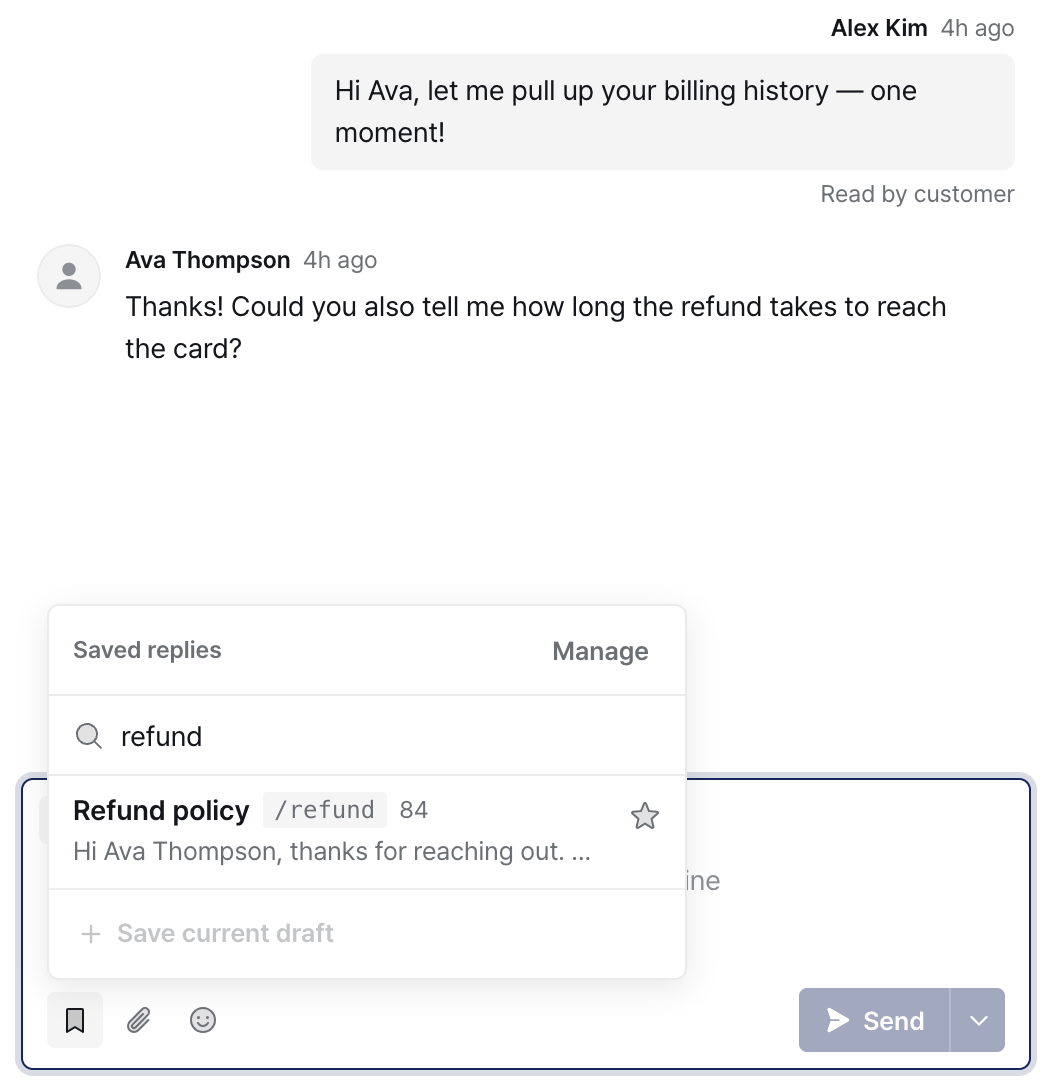
Searching saved replies for refund from the reply box (Lenit demo data)
Audit your scripts every quarter against real conversations
Templates start going stale the day you write them, so every quarter, review them against the last three months of conversations and usage counts, then fix, retire, or promote each one. The real risk isn't a stiff sentence; it's a template that still quotes last year's price or refund window.
Sort by usage — for your top 10, check that prices, policies, and menu names still match the product.
Retire what nobody uses — if a template sat untouched for three months, find out whether it's hard to find or no longer needed, then rename or delete it.
Rewrite what everyone edits — if your team changes the same line every time they send it, the template is wrong, not the team.
Promote top answers to help docs — if you send the same answer every week, customers could find it on their own, or an AI agent could answer it.
Add what's new — turn questions that started last quarter (a price change, a new feature) into templates.
In Lenit, the saved replies list shows how many times each reply has been used and sorts by most used, so steps 1 and 2 take one screen. For step 4, AI collects questions worth turning into FAQs as conversations close and lists them under Pending review on the FAQ screen. Approve one and it's published to your FAQ; Leni answers from it in the next conversation.
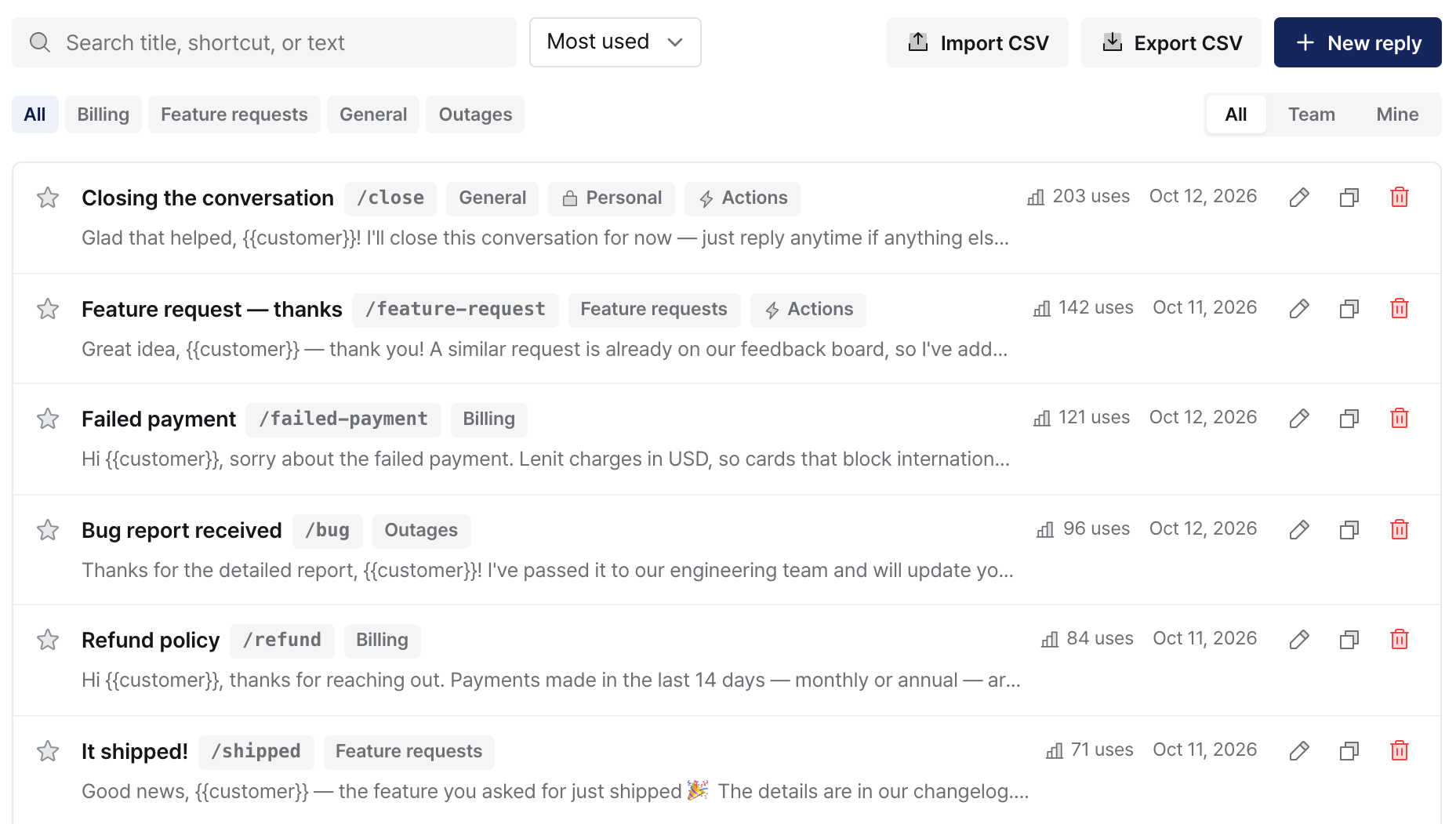
Saved replies sorted by most used (Lenit demo data)
The more you do of step 4, the less reaches your team. How much help docs move the AI resolution rate is in our AI chatbot resolution rate guide.
Wrapping up
Use templates as a frame (acknowledge, check, resolve, next step) and add one line in the customer's own words before you hit send. In SaaS support, where billing and outage questions rarely close in one reply, the line that promises the next update is the one not to skip.
If you're comparing support tools, see our Crisp alternatives guide; if you're weighing AI support costs, the AI chatbot pricing comparison runs the numbers.
If your team types the same answers every day, Lenit is free to start, and the 14-day trial includes saved replies and AI support. Plans are a flat price per workspace with AI replies included, and you can import your existing canned responses from a CSV. If you're moving from another help desk, send us your help center's URL and our team will migrate the articles for free. 🙂
Frequently asked questions
How many canned responses should a support team start with?
Ten to fifteen is plenty. Pull your last 100 conversations, group them by type, and write templates for the most common ones first. Keep a template only if your team actually uses it in the first month; a library that's too granular makes the right reply harder to find.
What's the difference between a macro and a canned response?
A canned response is saved text. A macro is saved text plus actions, such as adding a tag, assigning the conversation, or closing it after you send. Many help desks use the two terms interchangeably, so check whether your tool's version can run actions or only inserts text.
Do you still need live chat scripts if you have an AI chatbot?
Yes. An AI chatbot handles questions your docs already answer, which leaves your team the conversations that need judgment: refunds, account changes, and upset customers. Those are exactly where templates save the most time. Your most-used templates also make good source material for the help docs the AI answers from.
Can you use the same templates for email support?
Keep the structure and change the format. Email is read in one go, so put a greeting, a short summary, numbered steps, and a sign-off in a single message. In chat, send the same content as two or three short messages. Because email replies take longer, always say when you'll follow up.
When is it OK to end a chat with an abusive customer?
After one clear warning. Tell the customer you want to help but will pause the chat if the language continues, then follow through if it does. Write the rule down so everyone on your team handles it the same way, and keep the transcript in case you need to escalate.
Who should own the script library?
One person, even on a small team. Shared templates that touch policy, like billing, refunds, and outages, need a single owner who updates them when prices or rules change. Personal templates for greetings and sign-offs can stay with each person, which keeps policy wording consistent without making everyone sound the same.